Product Warranty Registration
To register your product warranty, please visit our Amway page and follow these steps:
Step 1: Go to Amway's website.
Malaysia: https://www.amway.my
Singapore: https://www.amway.sg
Brunei: https://www.amway.com.bn
Step 2: Navigate to the footer and select "Product Warranty Registration".
Step 3: Enter product serial number or upload a photo of serial number.
Step 4: Click on 'LOOKUP".
Step 5: Your product will be displayed. Click Continue to proceed with your warranty registration.
Step 6: Fill in the your First Name, Last Name, ABO/APC Number (Optional), Email Address, Country Dial Code with Phone Number & click on "REGISTER THIS PRODUCT".
Step 7: Your product warranty registration is completed successfully.
🔗 Click here to register your product warranty
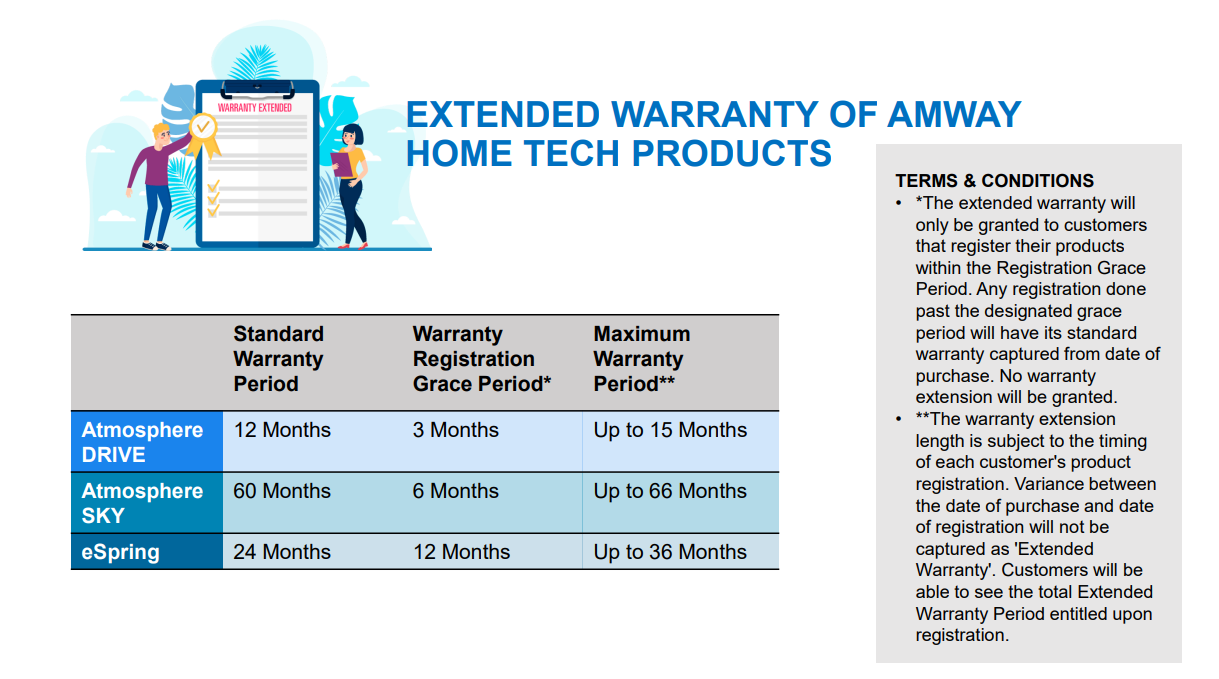
Extended Warranty for Home Tech products
In an effort to continue supporting the business operations of our ABOs, we are providing you and your customers with a grace period for registering your product warranty with us. It is encouraged that your product warranty be registered with us within the first month from the date of purchase.
If you register your warranty early with us, you can enjoy an extended warranty period ranging anywhere from 3 months to 1 year.